

Configuration
This guide covers how to configure the NetDefense plugin through the OPNsense web interface.
Accessing NetDefense Settings
-
Log in to your OPNsense web interface
-
Navigate to Services > NetDefense > Settings
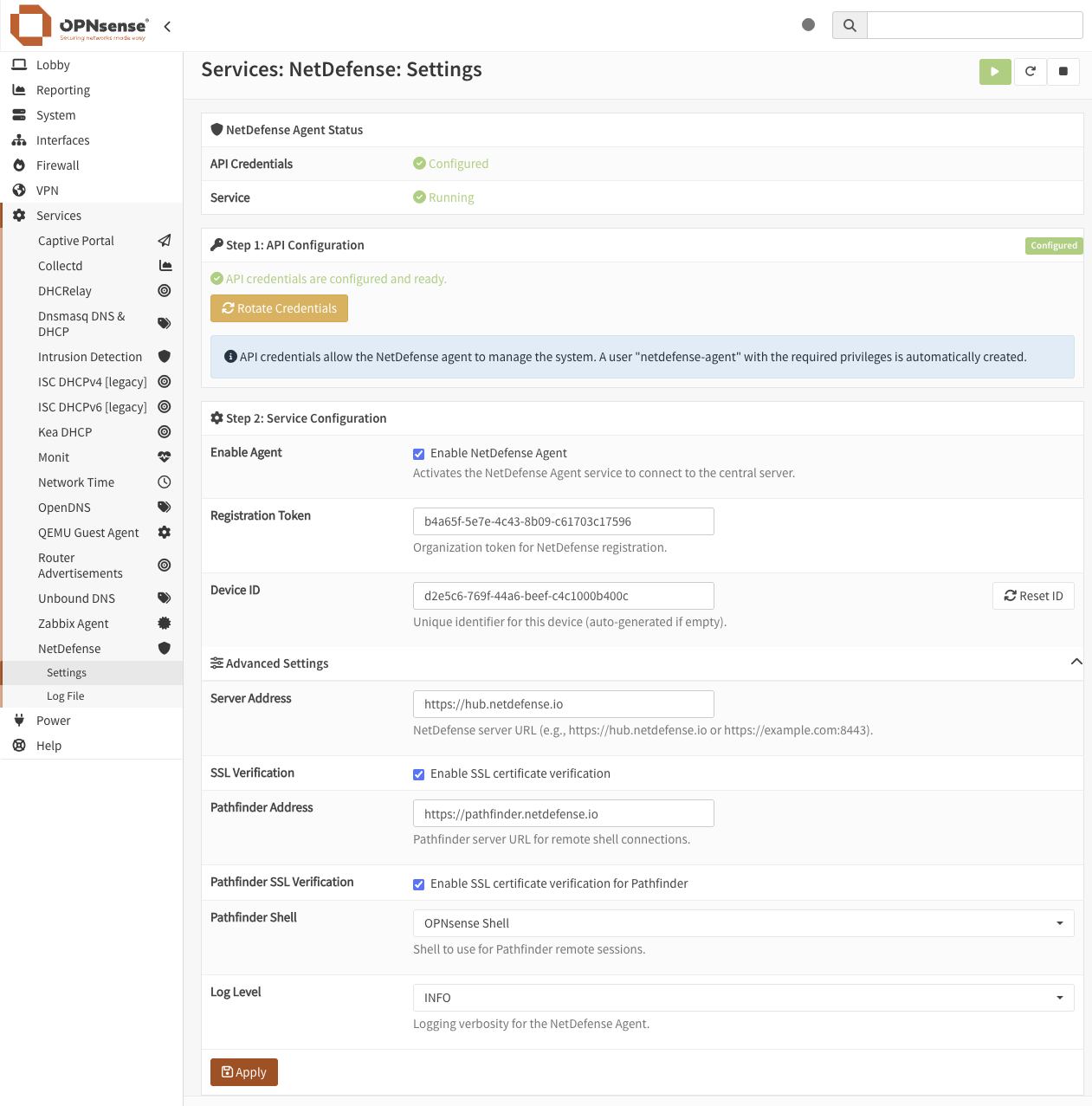
Basic Configuration
The settings page is organized into two steps followed by an advanced section.
Step 1: API Configuration
| Setting | Description |
|---|---|
| API Credentials | OPNsense API key and secret used by NDAgent to manage the system. A dedicated netdefense-agent user with the required privileges is automatically created on first use. The status indicator shows whether credentials are configured and ready. Use the Rotate Credentials button to generate a new key/secret pair. |
Step 2: Service Configuration
| Setting | Description |
|---|---|
| Enable NetDefense Agent | Activates the NetDefense Agent service to connect to the central server. |
| Registration Token | UUID token provided by your NetDefense organization for device registration. |
Advanced Settings
Click the Advanced Settings toggle to reveal additional configuration options:
| Setting | Default | Description |
|---|---|---|
| Device ID | Auto-generated | Unique UUID identifier for this device. Auto-generated on first load if empty. |
| Server Address | https://hub.netdefense.io | NetDefense server URL. Only change if using a self-hosted deployment. |
| SSL Verification | Enabled | Verifies SSL certificates when connecting to the NetDefense server. |
| Pathfinder Address | https://pathfinder.netdefense.io | NDPathFinder server URL used for remote shell connections. Only change if using a self-hosted deployment. |
| Pathfinder SSL Verification | Enabled | Verifies SSL certificates when connecting to NDPathFinder. |
| Pathfinder Shell | OPNsense Shell | The shell launched when a remote session is opened via ndcli device connect. Defaults to the OPNsense interactive menu. Any shell installed on the device (e.g., bash, sh, csh, tcsh) will appear as an option in the dropdown. |
| Log Level | INFO | Controls the verbosity of agent logs (DEBUG, INFO, WARNING, ERROR). |
Enabling NetDefense
-
Navigate to Services > NetDefense > Settings
-
Check the Enable NetDefense Agent checkbox
-
Enter your Registration Token
Your registration token is available from your NetDefense organization settings. It should be in UUID format (e.g.,
12345678-1234-1234-1234-123456789abc). -
Click Apply
The agent will start and attempt to register with the NetDefense server. Check the Log File to monitor the registration process.
Disabling NetDefense
-
Navigate to Services > NetDefense > Settings
-
Uncheck the Enable NetDefense Agent checkbox
-
Click Apply
This will stop the NetDefense Agent service. The device will go offline in your NetDefense dashboard but will retain its configuration for when you re-enable it.
Configuration Reference
API Credentials
Auto-generatedNDAgent requires OPNsense API credentials to apply configuration changes to the firewall. The plugin automatically creates a dedicated netdefense-agent OPNsense user with the minimum required privileges and generates an API key/secret pair for it.
You can rotate the credentials at any time using the Rotate Credentials button — for example, to comply with a key rotation policy, after a suspected compromise, or following personnel turnover. The agent picks up the new credentials automatically with no restart or downtime required.
Registration Token
RequiredThe registration token links your OPNsense device to your NetDefense organization. Obtain this token from your NetDefense organization settings:
-
Log in to your NetDefense account
-
Navigate to Organizations and select your organization
-
Copy the Registration Token
Device ID
Auto-generatedEach device requires a unique identifier. It is automatically generated when the settings page first loads. Use the Reset ID button to generate a new UUID if needed.
Server Address
AdvancedThe server address specifies which NetDefense server the agent connects to for configuration syncs and management:
- Default:
https://hub.netdefense.io(NetDefense cloud service) - Self-hosted: Enter your self-hosted NetDefense server URL (e.g.,
https://netdefense.example.com:8443)
SSL Verification
AdvancedWhen enabled (default), the agent verifies the SSL certificate of the NetDefense server. Only disable this when using a self-signed certificate on a self-hosted deployment, or temporarily while troubleshooting connectivity issues.
Pathfinder Address
AdvancedThe address of the NDPathFinder relay server, used to establish remote shell connections via ndcli device connect:
- Default:
https://pathfinder.netdefense.io(NetDefense cloud service) - Self-hosted: Enter your self-hosted NDPathFinder URL
Pathfinder SSL Verification
AdvancedWhen enabled (default), the agent verifies the SSL certificate of the NDPathFinder server. Follows the same considerations as SSL Verification above.
Pathfinder Shell
AdvancedSelects the shell that is launched when a remote session is opened via ndcli device connect. The dropdown lists all shells currently installed on the device. OPNsense ships with several shells by default (sh, csh, tcsh, and the OPNsense interactive menu). Additional shells installed on the device (e.g., bash) will appear automatically as options.
Log Level
AdvancedControls the verbosity of the NetDefense Agent logs:
| Level | Description |
|---|---|
| DEBUG | Detailed diagnostic information. Use for troubleshooting. |
| INFO | General operational information (recommended for production). |
| WARNING | Warning messages for potentially harmful situations. |
| ERROR | Error events that might still allow the agent to continue running. |
Viewing Service Status
Via Web Interface
Navigate to Services > NetDefense > Log File to view real-time agent logs. This integrated log viewer shows:
- Service start/stop events
- Registration status
- Connection events
- Task execution results
- Any errors or warnings
Via Command Line
service ndagent status
tail -f /var/log/ndagent.log
grep ndagent /var/log/messages
Applying Configuration Changes
After making any configuration changes:
-
Click the Apply button at the bottom of the settings page
-
The service will automatically restart with the new configuration
-
Check the Log File page to confirm the service started successfully
User Permissions
Access to the NetDefense plugin requires the Services: NetDefense permission. To grant access:
-
Navigate to System > Access > Groups
-
Edit the desired group
-
Under Assigned Privileges, add Services: NetDefense
-
Save the changes
This grants access to:
- NetDefense settings page
- NetDefense log viewer
- NetDefense API endpoints