When you open a console on a firewall with ndcli device connect, or let an AI assistant run commands through the MCP server, the session needs a way through. Most firewalls sit behind NAT and accept no inbound connections, so until now every session went through one NetDefense relay in the middle. Both ends dialled out to it and it passed the traffic along.
That works anywhere, but it has two costs. Every keystroke travels to the relay and back, wherever the relay is. And the relay sits inside the session: each leg to it is encrypted, but the session itself is not end-to-end encrypted. Today we’re adding a second option, direct-peer + encrypted relay. It’s experimental, and an organization can switch it on.
TL;DR
- Your client and the firewall try to connect directly, peer to peer, through NAT. When they can’t, a NetDefense-operated regional relay forwards their encrypted packets, which it cannot read.
- The session is end-to-end encrypted between your client and the firewall, with a key sealed to the firewall’s own identity key. The default websocket relay is not end-to-end encrypted.
- Relays run in the Americas (São Paulo), the US (New Jersey) and the EU (Frankfurt). More regions can come on demand: open a support ticket and we’ll look at yours.
- It’s an organization-wide setting, chosen by a Superuser (SU), along with the relay region. It needs NDAgent 1.32.0 and ndcli 1.50.0 or later.
Two transports, one setting
An organization’s remote sessions now run on one of two transports:
- Websocket relay, the default. Nothing changes for organizations that stay on it.
- Direct-peer + encrypted relay, new and experimental.
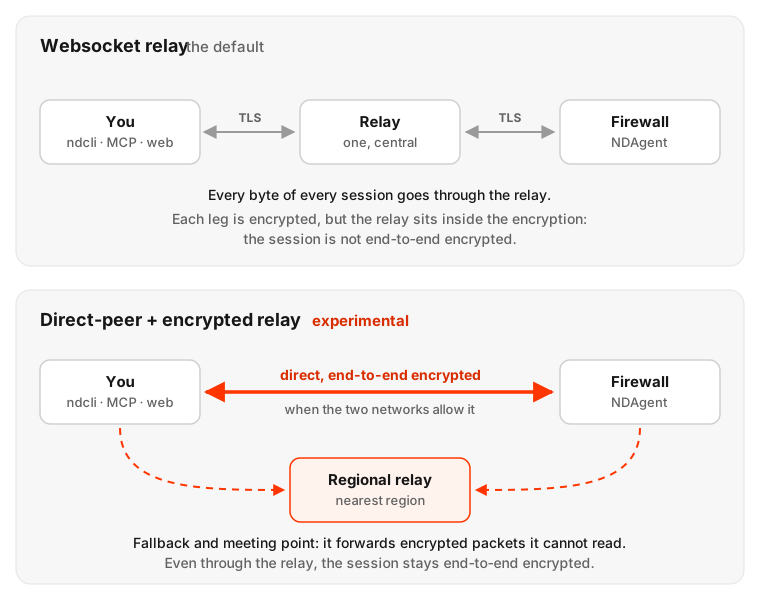
The choice belongs to the organization, not to each session. A Superuser picks the transport and the relay region for everyone, and from then on the control plane decides each session from that setting. You don’t pick per connection, and your client can’t override it.
How a session finds its way
Picture two people in different office buildings who want to talk, but each building’s front desk only lets calls out, never in. They could both call a switchboard and have every word passed along, which is the websocket relay. Or they could use the switchboard only to swap phone numbers and agree a moment to call each other at once, so each front desk sees an outgoing call. That’s the idea behind NAT traversal, and it’s the first thing a direct-peer session tries.
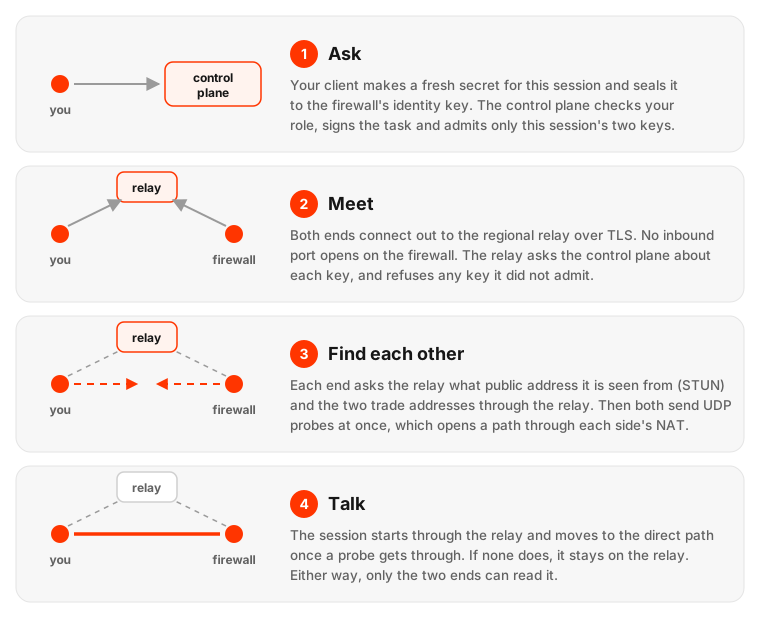
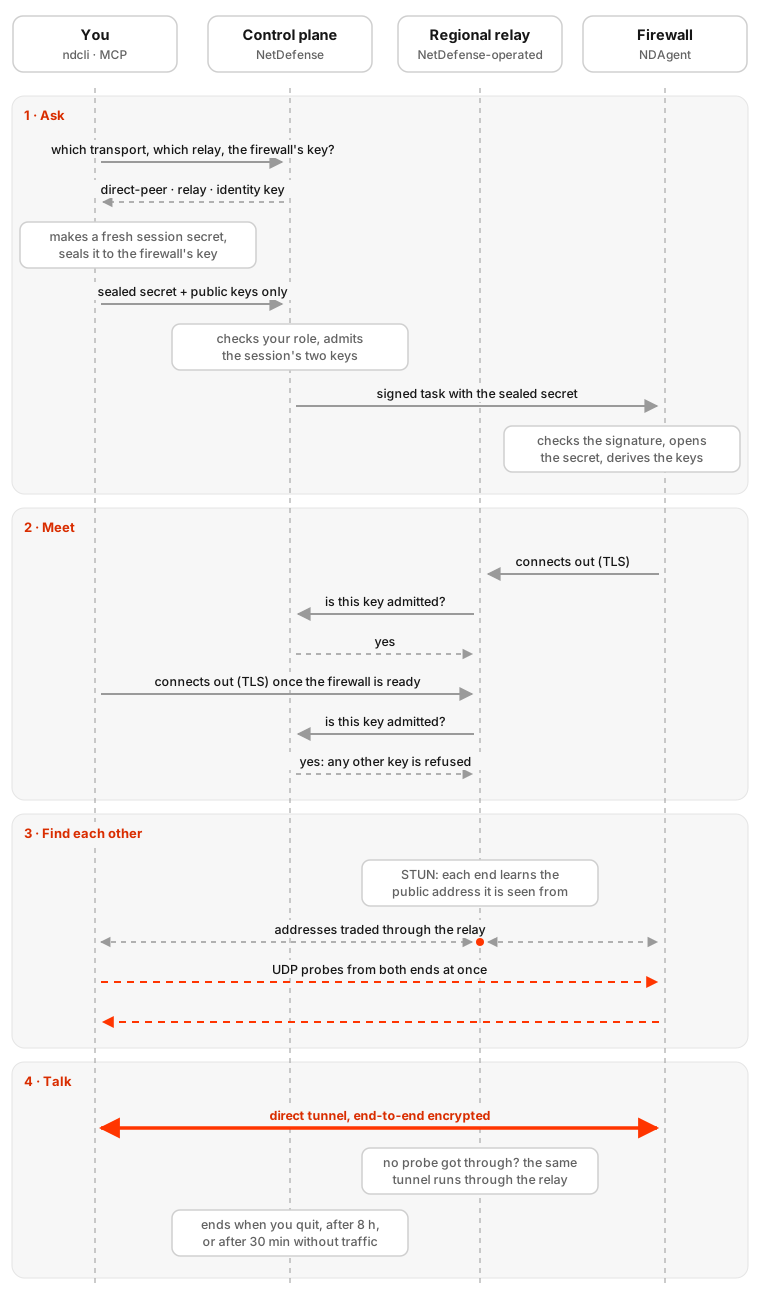
- Ask. When you connect, your client makes a fresh random secret for this one session and derives from it the keys both ends of the tunnel will use. It seals the secret to the firewall’s identity key, the key the firewall generated for itself when it joined NetDefense, so only that firewall can open it. The control plane checks that your role allows the session, then sends the firewall a signed task carrying the sealed secret. It receives the sealed form and the tunnel’s public keys, never the secret itself.
- Meet. Both ends connect out to the organization’s regional relay over TLS. Nothing opens inbound on the firewall. The relay is the meeting point: for every connection it asks the control plane whether that key belongs to a session it admitted, and refuses anyone else.
- Find each other. Each end asks the relay which public address and port it appears to come from, through the STUN protocol. They trade those addresses through the relay, then both send UDP probes to each other at the same moment. To each side’s NAT, the other’s probe looks like the answer to a packet that just went out, so it lets it in.
- Talk. The session starts on the relay and moves to the direct path once a probe gets through. Some networks never allow that, for example when UDP is blocked or a NAT changes the port for every destination. Then the session stays on the relay. Either way it’s the same end-to-end encrypted tunnel: the relay forwards packets it can’t read.
Here are the same stages as a timeline, showing who talks to whom, in order:
ndcli tells you which transport it used, and when the session ends, which path it last took:
On a network that never allows a direct path, the last line reads relayed (through the encrypted relay) instead.
What the encryption covers, and what it doesn’t
Where the guarantee comes from
The session secret is made on your side and sealed to the firewall’s identity key, whose private half never leaves the firewall. The control plane, its database and the relay only ever handle the sealed secret and public keys, so none of them can read the session or join it.
For the specialists, here’s the construction:
- Per-session secret. Your client draws a random 32-byte seed for each session, and a retry gets a new one. Both ends derive the same two tunnel keys and a pre-shared key from it with HKDF-SHA256.
- Sealing. The seed is sealed to the firewall’s Ed25519 identity key with HPKE, bound to that session. The firewall opens it with its private key, derives the same keys, and refuses a session whose values don’t match.
- Tunnel. The tunnel is WireGuard-based, with the pre-shared key mixed in, and it’s carried over UDP when the path is direct, or over the relay’s TLS connection when it isn’t.
- Admission. A relay accepts a connection only when the control plane confirms that its key belongs to a session the control plane registered. If the control plane can’t answer, the answer is no.
- Limits. A direct-peer session ends after 8 hours, or after 30 minutes without traffic. Open a new one to continue.
Two honest limits. First, your client learns the firewall’s identity key from the control plane. The control plane never holds a session’s secret, but you still rely on it, as everywhere in NetDefense, to tell you which key belongs to which firewall. What direct-peer removes is the relay and the network path from the list of places that could read a session. Second, the default websocket relay isn’t end-to-end encrypted: each leg is TLS, but the relay sits inside the encryption. If that matters to you, switch your organization to direct-peer.
Why direct is faster
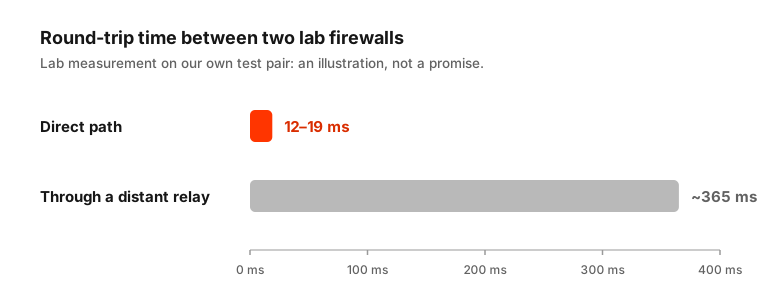
On a direct path, packets take the shortest route the internet offers between your laptop and the firewall. Through a relay, they go to the relay and back out, and if the relay is far away, that detour is most of the delay. A console where every keystroke waits a third of a second feels very different from one that answers at once.
Regional relays
When a session can’t go direct, the next best thing is a relay close to both ends. Instead of one central relay, direct-peer uses regional relays, run by NetDefense on its own servers: in the Americas (São Paulo), the US (New Jersey) and the EU (Frankfurt). The relay is also where every session’s ends first meet, so a close one makes even sessions that go direct start sooner.
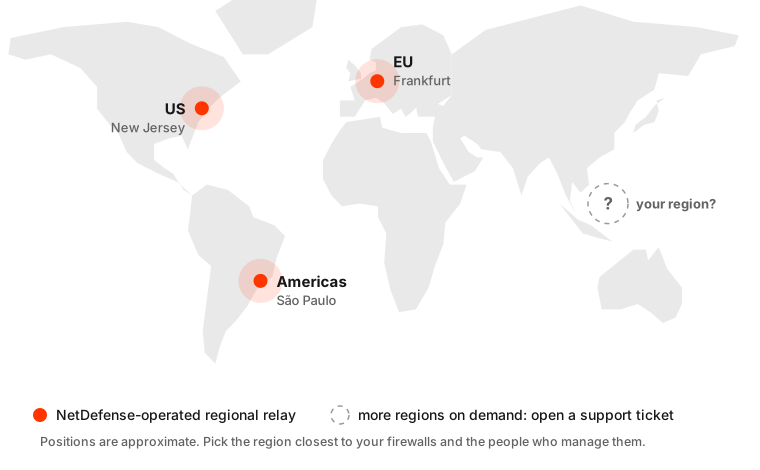
Your region isn’t on the map? Open a support ticket from the web console or with ndcli support, and tell us where your firewalls and your team are. We’ll look at adding a relay there.
Turn it on
Only a Superuser (SU) of the organization can change the transport, from an interactive login. The control plane refuses the change from a personal access token. It applies to the next session; sessions already open keep running.
From the CLI (ndcli 1.50.0 or later), list the relays on offer and the current setting, then choose direct-peer with a relay’s id from that list:
set asks before it changes anything; -y skips the question. To go back, run ndcli org connect-transport set relay-legacy.
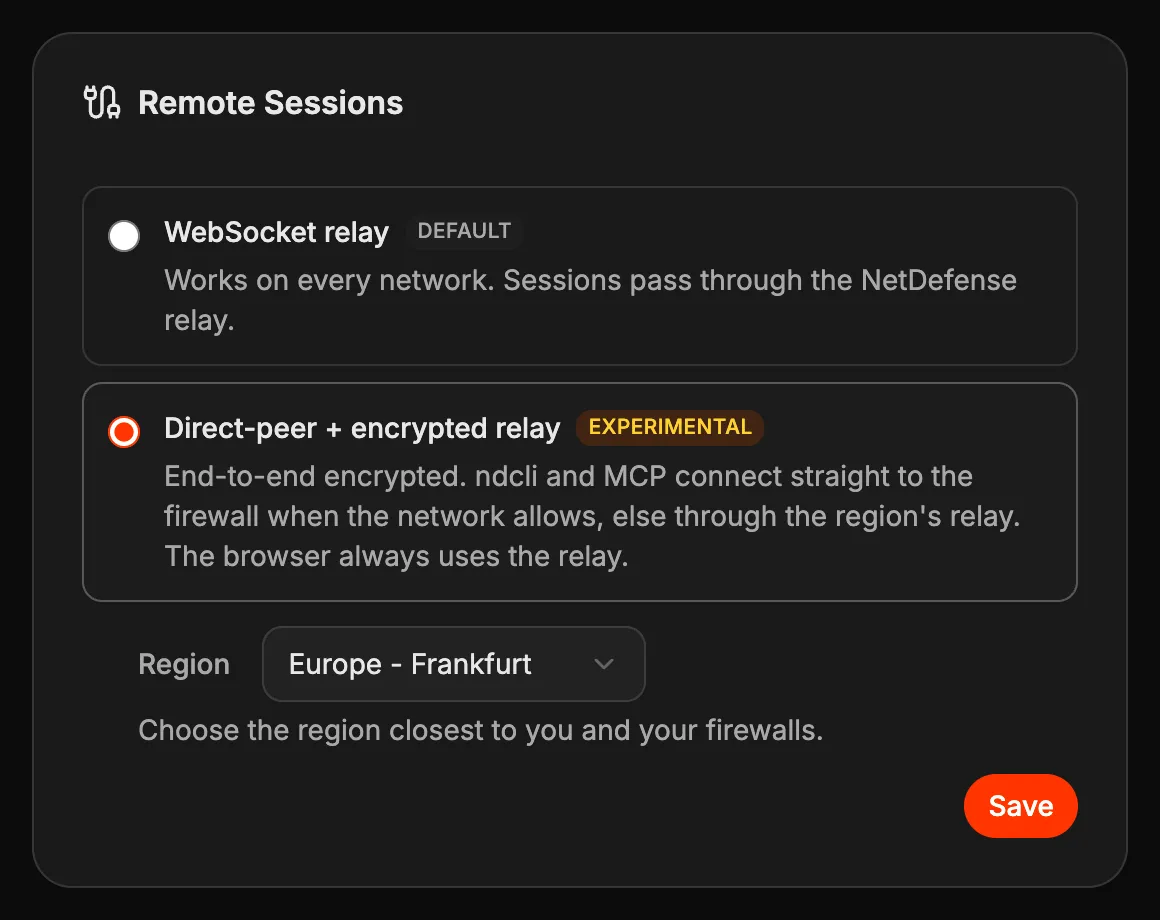
From the web console, open the organization’s page and find the Remote Sessions card. A Superuser picks Direct-peer + encrypted relay, which carries an Experimental tag, chooses a Region from the list, grouped by continent, and presses Save. The console asks for a confirmation before it changes anything. Every other member sees the transport and region in use, without the choice.
What each end needs
- The firewall: NDAgent 1.32.0 or later. An older agent keeps working, but on the websocket relay.
- Your client: ndcli 1.50.0 or later. The MCP server shipped with ndcli uses the same setting for its console tools.
- The network: outbound HTTPS to the relay, as for the websocket relay. For a direct path, the two ends also need to exchange UDP, which most home and office networks allow for outgoing traffic. No port forwarding is needed on either side.
When the firewall’s agent or your client is too old for direct-peer, the session runs on the websocket relay instead, and ndcli says so and why before it starts. Once a direct-peer session is under way, nothing switches it over: a direct-peer session that fails to set up fails, and isn’t quietly retried on the websocket relay.
In the browser
The web console’s Connect follows the same setting. In an organization set to direct-peer, its sessions are end-to-end encrypted too, but always go through the regional relay: browsers can’t do the UDP probing that a direct path needs. Direct paths are for ndcli, the MCP server and the agent.
Built on open source, run on our servers
The direct-peer transport is built on the open-source architecture of Tailcat, a BSD-licensed library from Tailscale®. It provides encrypted, peer-to-peer tunnels between two machines, with NAT traversal and a relay as the fallback when a direct path isn’t possible. We use the library on both ends of each session, in ndcli, the MCP server, the web console and NDAgent.
NetDefense runs this technology on its own servers. It doesn’t depend on, or use, Tailscale’s service or infrastructure: every session is pinned to the relay region your organization chose, and our builds leave out the library’s remote logging. You don’t need a Tailscale account.
Building on an open tunnel design was a deliberate choice over inventing our own. What protects your sessions is how NetDefense uses it: a secret sealed to each firewall’s identity key, and relays that admit only the sessions the control plane authorised. The library’s source is public, so your team can review that part too.
It’s experimental
Direct-peer + encrypted relay is new, and we’re labelling it experimental while it runs on more networks than ours. It’s an organization-wide choice, the default stays the websocket relay, and going back is one command. If you try it, we’d like to hear how it behaves on your networks: open a support ticket with what you saw.