NDWeb
NDWeb is the web interface to the NetDefense control plane. Everything you can do from NDCLI or the MCP server is also available from NDWeb, plus a few visual workflows that work best with a pointer — browsing tasks, editing snippets in a Monaco editor, opening a device terminal in the browser.
Access NDWeb
Section titled “Access NDWeb”Signing in
Section titled “Signing in”Click Sign In on the landing page and complete interactive login (username + password or a passkey, depending on how your organization is configured). On your very first login you won’t belong to any organization yet — see Onboarding for the new-user experience.
Layout
Section titled “Layout”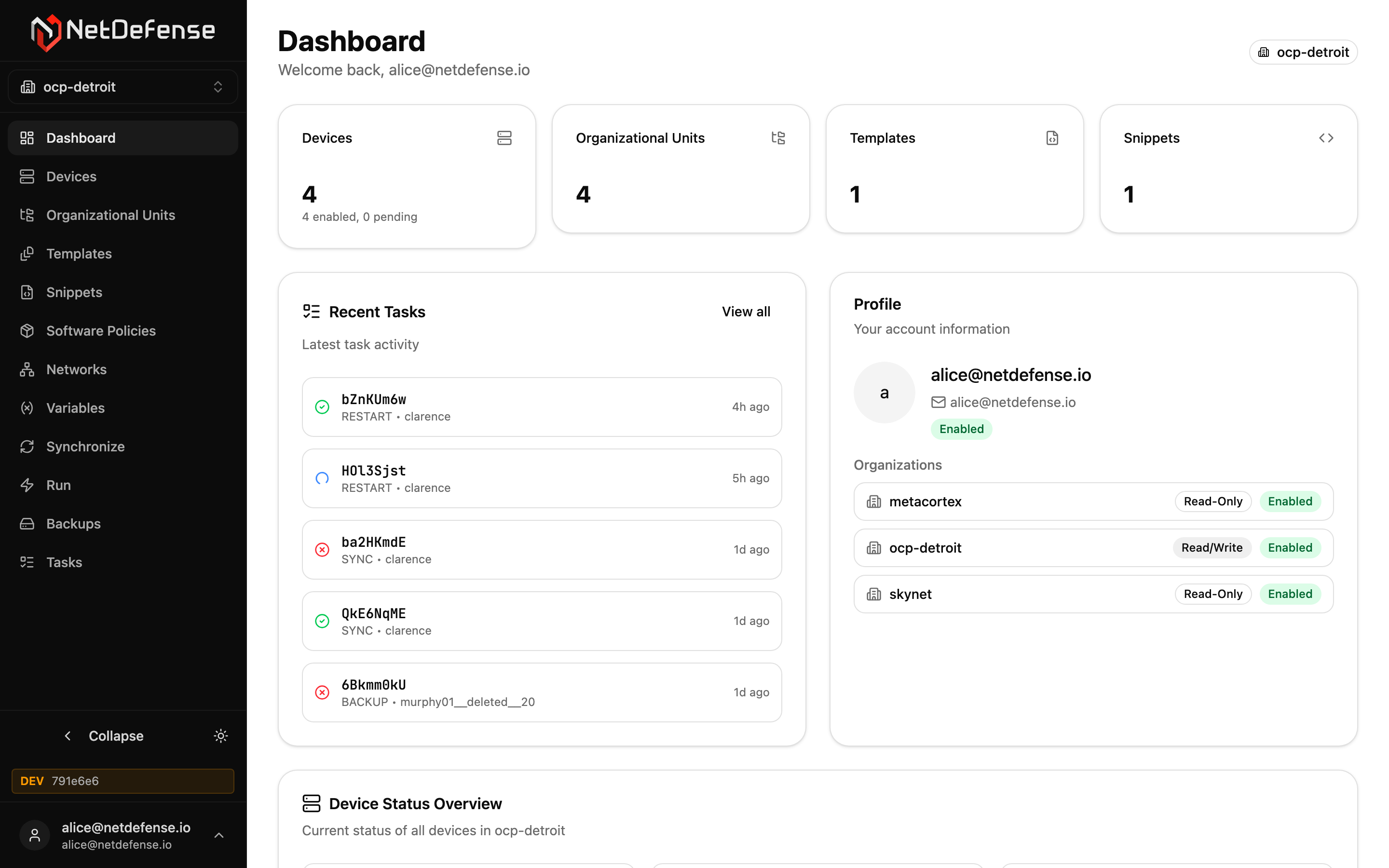
Every authenticated page in NDWeb shares the same three regions:
- Sidebar (left) — the organization switcher at the top, the main navigation in the middle, and your profile + theme toggle at the bottom. Click Collapse to shrink the sidebar to icons only.
- Header (top of main area) — the page title and a one-line description, plus page-level actions on the right (such as Create Snippet, Sync, or Add Override).
- Content — the page itself: a table, a detail card, an editor, a form, or a wizard.
The sidebar’s organization switcher is the single source of truth for which organization you’re operating on. Changing it reloads the entire app with the new organization’s data — every list, every count, every override scope follows the switcher.
Sections
Section titled “Sections”| Section | Purpose |
|---|---|
| Dashboard | Per-organization overview: action items, device, sync, and task counts, versions, and each device’s health |
| Devices | List, enrol, and inspect OPNsense devices |
| Organizational Units | Group devices by department, location, or function |
| Templates | Bundle snippets into reusable configuration templates |
| Snippets | Author the configuration fragments that templates compose |
| Software Policies | Declare which OPNsense plugins and FreeBSD packages should be present or absent |
| Networks | Build and manage WireGuard overlay networks |
| Variables | Parameterise snippets per device or OU |
| Synchronize | Push the computed configuration to devices |
| Run | Issue ad-hoc commands now or on a schedule |
| Backups | Configure encrypted off-device backups |
| Firmware | Stage OPNsense updates across the fleet with firmware tracks |
| Tasks | See what NetDefense ran on your devices, and how it went |
| Organization management | Members, invitations, organization settings |
| Support | Open and follow tickets with NetDefense Support |
Roles and what you can do
Section titled “Roles and what you can do”The actions surfaced in NDWeb depend on the role of your account in the active organization:
| Role | What NDWeb lets you do |
|---|---|
| Read-Only | Browse every page. Most create, edit and delete buttons are hidden; where one still shows, NetDefense refuses the change. |
| Read-Write | Everything Read-Only does, plus create/edit/delete devices, snippets, templates, OUs, networks, variables, and tasks. |
| Admin | Everything Read-Write does, plus organization settings, members, and invitations. |
The screenshots in this manual are taken as a Read-Write user. If you don’t see a button mentioned here, check your role on the Organizations page or ask an admin.