Run
The Run page is where you tell devices to do something now that isn’t a configuration change — ping a host, reboot a device, install or reload the agent plugin, upgrade firmware, back up the configuration. It targets one device, several devices, an OU, or the entire organization, and, for most commands, lets you defer execution to a later time. Read the conceptual background in Run Command.
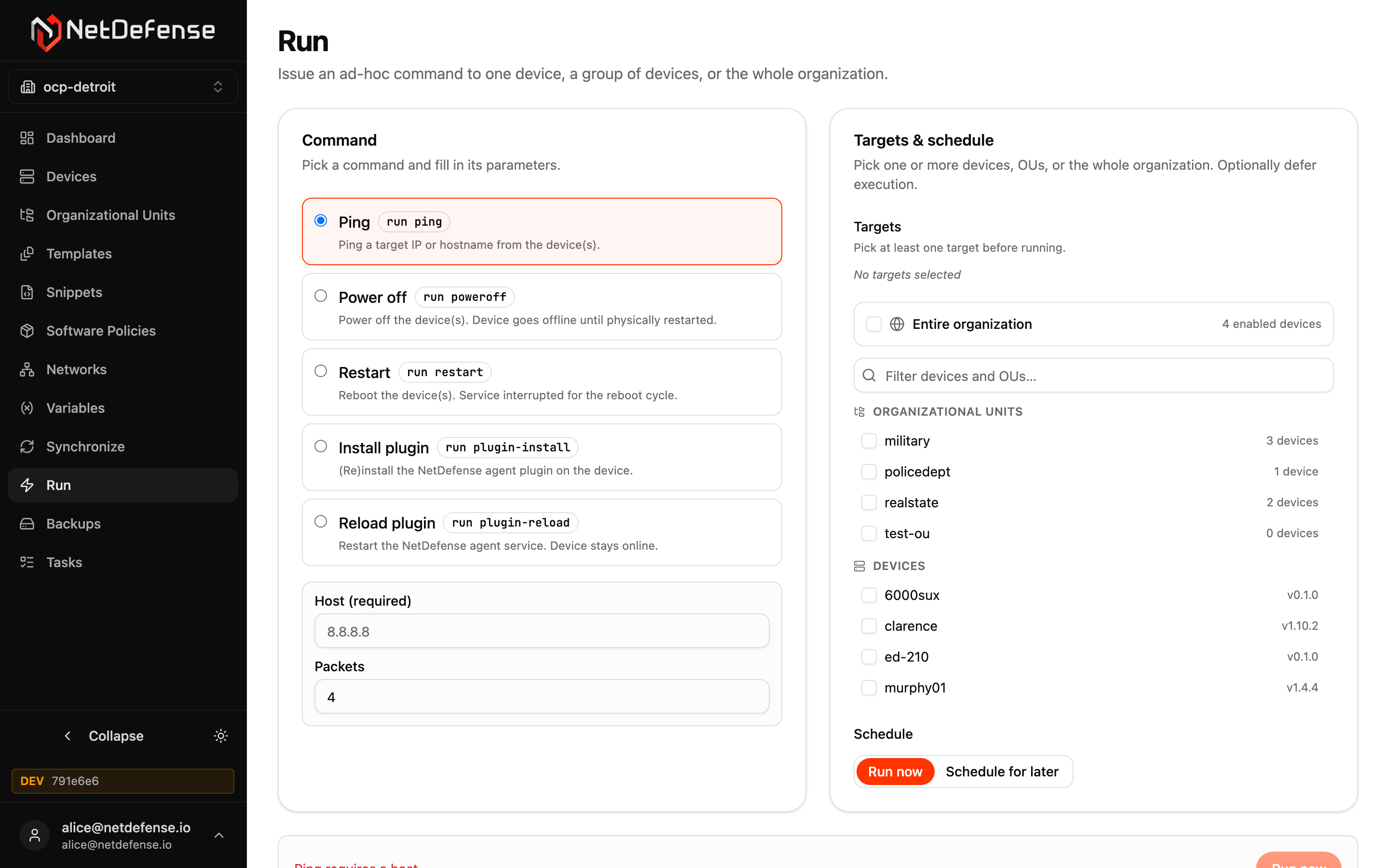
How the page is organized
Section titled “How the page is organized”Four numbered boxes run from top to bottom, in the order you fill them in: 1 Command, 2 Parameters, 3 Target, 4 Schedule. A bar at the bottom holds a summary line and the run button.
The summary line reads back what you are about to do, such as Ping on 2 devices, immediately. While something is missing or wrong, the same line says what, for example that no target is picked, and the button stays disabled.
1. Command
Section titled “1. Command”Open the dropdown and pick one command. They are grouped by category:
| Category | Command | What it does |
|---|---|---|
| Diagnostics | Ping | run ping — ICMP from the device(s) to a host or IP. Useful as a quick reachability probe. |
| Power | Power off | run poweroff — the device shuts down. It goes offline until physically restarted. |
| Power | Restart | run restart — reboots the device. Service is interrupted for the reboot cycle. |
| Agent | Install plugin | run plugin-install — (re)installs the NetDefense agent plugin on the device. |
| Agent | Reload plugin | run plugin-reload — restarts the NetDefense agent service without rebooting. The device stays online. |
| Firmware | Upgrade firmware | run firmware-upgrade — upgrades OPNsense firmware, minor or major. See the firmware options below. |
| Backup | Backup | run backup — backs up the configuration of the device(s) now. Only devices with backup enabled are backed up. See Backups. |
Power off and Restart carry a Disruptive badge.
To search, type in the dropdown. It matches command names and related keywords, shows the best match first, and Enter picks it. The command-line form works too: typing run ping finds Ping.
2. Parameters
Section titled “2. Parameters”This box shows only the fields of the selected command.
| Command | Fields |
|---|---|
| Ping | Host, required; and Packets, the number of packets, 4 by default. |
| Install plugin | An optional version to pin, as a full version such as 1.5.2. Leave it empty to install the latest version in the device’s channel. |
| Upgrade firmware | Mode, Reboot after upgrade and Dry run, described below. |
| Power off, Restart, Reload plugin, Backup | None. |
For Upgrade firmware:
- Mode is Minor (a point release within the current series) or Major (a series upgrade).
- Reboot after upgrade is on by default, and a complete update needs it. A major upgrade always reboots, so the switch is locked on in Major mode.
- To skip the reboot on a minor upgrade, switch Reboot after upgrade off. NetDefense then applies only the packages that don’t need a reboot, and a mixed-state warning appears under the fields: base and kernel stay on the old version until a later run with the reboot on. See Mixed state.
- Dry run checks and reports what would be updated, and applies nothing.
3. Target
Section titled “3. Target”Two modes choose what the command is sent to.
Entire organization targets every enabled device, including ones that join before the run is dispatched. The filters don’t apply in this mode. To leave some devices out, use Devices and OUs.
Devices and OUs combines OUs and individual devices:
- Add OU targets the OU itself, so its membership is followed: the command reaches every enabled member when it is dispatched, devices added later included.
- The device table narrows down with a name search and filters for OU, Agent, OPNsense, Status and Track. The Track filter appears only when your organization has firmware tracks. Each filter shows how many devices match each choice, and the box shows
Matching N of M.- OPNsense is the version as the device reports it, grouped by series. Devices that haven’t reported one are in an Unknown group.
- Agent also has a Not the newest shortcut.
- Select all N matching selects every device the filters match, not only the rows on screen. The table shows the first 200 rows.
- Your selection is kept when you change the filters. Show selected only limits the table to the devices you picked, and Clear selection empties the selection.
A line under the table counts what you picked, such as Selected: 3 devices, 1 OU.
Devices in a firmware track
Section titled “Devices in a firmware track”Firmware upgrades for a device in a firmware track are managed by the track. So with Upgrade firmware selected:
- A device in a track is greyed out and marked
Skipped: in a firmware track. Select all skips it. - Run is blocked when Entire organization, or an OU you chose, would reach a device in a track. The box says how many devices are in the way. Pick the other devices individually instead, or move those out of their track first.
Devices without backup
Section titled “Devices without backup”With Backup selected, only devices that have backup enabled on Backups are backed up:
- A device you pick, or a member of an OU you pick, that has no backup enabled is not backed up. It is listed under Skipped with the reason once the run is sent.
- Entire organization takes just the devices with backup enabled and lists none of the others.
4. Schedule
Section titled “4. Schedule”Three modes say when the command runs:
- Run now — dispatches the command immediately. Each affected device gets a new task that you can follow on Tasks.
- Later — runs the command once, at a time you type. A time is required: an offset such as
30m,2h,3dor1w, a date and time in your display timezone, or a timestamp that carries its own zone (RFC3339). These are the same inputs asndcli run --at. The page shows the resolved time as you type, asRuns at 2026-05-12T03:00:00Zfollowed by the same moment in your timezone. Until that time, each task shows as Scheduled on Tasks. - On schedule — registers the command as a recurring spec on one of your schedules, instead of running it once. It fires on every tick of that schedule, and the spec shows on the Scheduled specs tab of Tasks.
A command registered On schedule keeps devices you picked by name as a fixed list. A device that matches your filters later is not added. To follow membership, target an OU.
Backup offers only Run now: a backup starts immediately and can’t be deferred or put on a schedule from here. Recurring backups are set up on the Backups page.
Sending the run
Section titled “Sending the run”The bottom button reads Run now, Schedule or Register, to match the schedule mode.
Power off, Restart and a Major firmware upgrade (unless it is a dry run) first open a confirmation dialog. It names the command, the targets (such as 2 devices) and when it will run, and says what the run costs. Confirm to send it. Ping, Install plugin, Reload plugin, Backup and minor upgrades run without one.
Afterwards a card lists the tasks the run started, or scheduled with the time they activate, one per device with its status and a link to its page on Tasks. The statuses follow the tasks: the card reads them again every 5 seconds until every task has ended, and not while the browser tab is hidden. All tasks of this run opens the Tasks page on this run’s tasks over the last 30 days. For On schedule the page shows the registered spec with a link to the schedule instead. The card, or the spec, goes away once you change the command, its parameters, the targets or the timing.
Run actions don’t change persistent configuration — they’re one-off operations against the device. To roll out a configuration change use Synchronize.
Sending a backup
Section titled “Sending a backup”A Backup run lists the devices it left out under Skipped, each with its reason. They are the same reasons as for ndcli run backup.
A device that is offline does not take the backup later. Its task expires after about a minute, and shows as Expired on Tasks.
When no backup can start, the page shows an error instead of the task list:
- If every targeted device is skipped, for example a device you picked that has no backup enabled, the error lists each device’s reason.
- If the problem is the organization’s backup setup, the error also links to Backups to fix it: the organization has no backup configuration, the configuration is disabled, or, when you target the entire organization, no device has backup enabled.