Tasks
Every action NetDefense takes on a device is a task: a sync, a ping, a restart, a backup, a plugin install, a firmware step. The Tasks page lists them and how they went. It has two tabs: Tasks, the tasks themselves, and Scheduled specs, the recurring operations that create tasks on a schedule.
The default view
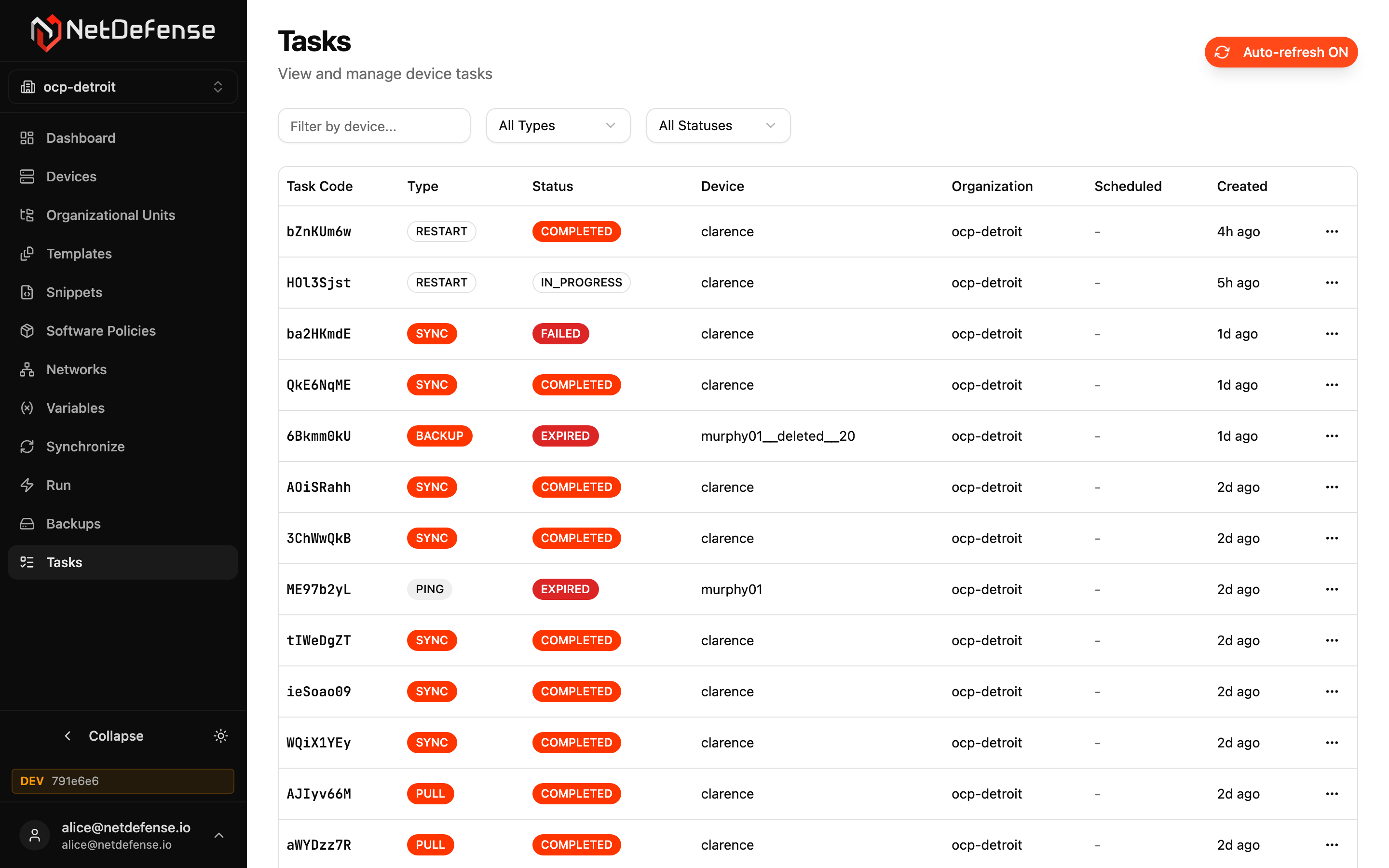
Section titled “The default view”The page opens on every task created in the last 24 hours, plus every task that is still waiting, scheduled or running, whenever it was created, newest first. Connect sessions, the tasks behind remote access sessions, are left out. The footer counts the tasks that match, such as 9 tasks created in the last 24 hours or still active. The list shows 20 tasks a page, with Previous and Next when there are more.
Filters
Section titled “Filters”The filter bar above the list changes the view. On a wide screen it stays in sight as you scroll.
Status presets
Section titled “Status presets”| Preset | Shows |
|---|---|
| All | Every status, canceled tasks included. This is the default. |
| Active | Waiting, Scheduled and Running tasks. |
| Needs attention | Failed and Expired tasks. |
| Completed | Completed tasks. |
Canceled tasks appear only under All. Each status is explained under Statuses.
Types and Connect sessions
Section titled “Types and Connect sessions”All types opens a list headed Show only these types. Tick the types you want, and the page shows only those. Select all and Clear sit at the top of the list. The button then reads the name of the one type you picked, or how many you picked, such as 3 types.
A task’s details give both its name and the type that ndcli uses:
| Name | Type | What it is |
|---|---|---|
| Ping | PING | Pings a host from the device. |
| Power off | SHUTDOWN | Shuts the firewall down. |
| Restart | REBOOT | Reboots the firewall. |
| Reload plugin | RESTART | Restarts the NetDefense agent, without a reboot. |
| Pull configuration | PULL | Reads configuration from the device. |
| Synchronize | SYNC | Delivers the device’s configuration. |
| Backup | BACKUP | Runs a configured backup. |
| Install plugin | PLUGIN_INSTALL | Installs or reinstalls the NetDefense agent plugin. |
| Upgrade firmware | FIRMWARE_UPGRADE | Updates OPNsense. |
| Firmware track step | FIRMWARE_TRACK | One step of a firmware track. NetDefense creates these. |
| Connect | CONNECT | One remote access session. |
Connect sessions aren’t in the type list. They have a checkbox of their own, Include Connect sessions, unticked in the default view. Tick it to list them too, beside whichever types you picked. A session’s row says who opened it, as for any task a person started.
Source
Section titled “Source”Any source opens the list of where tasks come from: Schedules, Firmware tracks or Manual. Pick one to see only its tasks. See Where a task came from.
Search by device or code
Section titled “Search by device or code”Type part of a device name or of a task code in Device or code to see the tasks whose code or device name contains it, whatever the case. The tasks of a deleted device are found by its name too. What you type is matched as written: fw.hq finds fw.hq, not fw-hq. The list changes once you stop typing.
One device, one schedule or one run
Section titled “One device, one schedule or one run”A link can narrow the list to one device, one schedule or one run. The filter bar then shows it as a chip, such as Device fw-branch-01, Schedule nightly-backup or Run R7x2Kp9Q. The × on a chip removes it.
- Device lists the tasks of the device with exactly that name: not those of a device whose name only contains it, nor those of a deleted device that had the same name. A device’s All tasks of this device link sets it.
- Schedule lists the tasks that the schedule’s specs created. A schedule’s All runs of this schedule link sets it.
- Run lists the tasks of one run. The This run button on a run’s header sets it, and so do a task’s Run in its details and All tasks of this run on the Run page.
Time range
Section titled “Time range”Last hour, Last 24 hours (the default), Last 7 days or Last 30 days. The range counts from when each task was created, but a task that is still waiting, scheduled or running shows whatever the range: a reboot you scheduled three days ago for tomorrow stays in the 24-hour view for as long as it’s active. The footer says so: 9 tasks created in the last 24 hours or still active.
Under Active, the list holds every active task whatever the range, and the footer reads 3 tasks still active. Under Needs attention and Completed, only the range counts: 12 tasks in the last 30 days.
Clear filters
Section titled “Clear filters”Clear filters appears as soon as the view differs from the default, and takes you back to it, chips included. When nothing matches, the page says No tasks match these filters and offers its own Clear filters.
Links and the Back button
Section titled “Links and the Back button”The page’s address holds the view: the preset, the types, Connect sessions, the source, the device, the schedule, the run, the search, the range, the page and the tab. Reload the page, bookmark it or share the link, and the same view opens. Changing a filter adds nothing to your browser’s history, and coming back from a task’s own page, with Back to Tasks or the browser’s Back button, returns you to the view you left.
In the address, device= names one device by its exact name: /tasks?device=fw-branch-01 opens the tasks of fw-branch-01 only, under a Device chip. To find part of a name, type it in the search box instead. run= names one run by its code, which is eight letters or digits: /tasks?connect=1&run=R7x2Kp9Q opens the tasks of that run.
The Tasks · 24h chart on the Dashboard, a device’s Recent tasks card and a schedule’s Recent runs card link into the page the same way.
The task list
Section titled “The task list”| Column | Meaning |
|---|---|
| Status | The task’s status. See Statuses. |
| Task | The type’s name and one line from the task’s result: the first line of the device’s answer, a sync’s summary, a firmware step’s or upgrade’s versions (Updated 26.1.9 → 26.1.11), or why the task failed, in red, or expired, in amber. A waiting or scheduled task says why it’s waiting, and a running one says Running on the device. |
| Source | Where the task came from: its schedule, linked to the schedule’s page, a firmware track, linked to the Firmware page, or, for a task a person started, the person’s name and the client they used, such as Manual · CLI. See Where a task came from. |
| Device | The device, linked to its page. A deleted device shows its name followed by (deleted), without a link. |
| When | What matters for the task’s state, as below. Hover it for the full date and time. |
| Code | The task code, the one ndcli task describe takes. |
Click a row to open the task’s details. A link in the row, the device, the source or a person’s name, opens its own page instead. The tasks of one run sit together under a header. In a narrower window, each row stacks into a card without the code, with the source under the device. The line under a source (a manual task’s client, or Schedule or Firmware track) is left out there, and the details have it.
| Status | When reads | The line below |
|---|---|---|
| Scheduled | Runs in 3 h, or Due now once its time comes | The day and time it runs, such as Today, 9:00 AM |
| Waiting | Queued 2 min ago | Its deadline: Deadline in 40 s, or Deadline passed 10 s ago just before the task turns Expired |
| Running | Started 10 s ago | Last update 5 s ago |
| Completed, Failed | Finished 22 min ago | How long it took, such as Took 3 min, or the day and time, such as Today, 5:55 PM, when that isn’t known |
| Expired | Expired 29 min ago | The day and time |
| Canceled | Canceled 13 s ago | The day and time, or Took 12 s for a task canceled after it was sent |
A task that was scheduled for later counts as queued from its scheduled time.
Started is when NetDefense sent the task to the device. A running task whose start isn’t recorded reads Queued 2 min ago, as a waiting one does. Took runs from that moment to the finish, so it counts what the device needed, not the time the task waited before it was sent. It rounds like the other relative times: Took 45 s, Took 3 min, and Took under 1 s for less than a second. A task that was never sent has nothing to measure, so an expired one, or one canceled before it ran, shows the day and time instead, as do older tasks.
Finished, Expired and Canceled count from the moment the task reached that status. When the device answers a task after it failed with a timeout, its answer takes the place of the timeout, and the finish time moves with it.
Relative times count both ways, in seconds, minutes, hours and days: in 3 h, 5 min ago, 2 d ago, and just now within five seconds. A time about a month away or more shows its date instead. All times are in the timezone you chose under Settings, your browser’s unless you changed it, and a full date and time names its zone: Oct 17, 2026, 5:55:34 PM PDT.
Why a task is waiting
Section titled “Why a task is waiting”A waiting or scheduled task says how its device stands, in place of a result:
| The device | A waiting task | A scheduled task |
|---|---|---|
| Is connected | Device online, delivering | Device online, waiting for its scheduled time |
| Isn’t connected | Device offline since 10:41 PM, waiting | Device offline since 10:41 PM, waiting |
| Has never connected | Device offline, waiting | Device offline, waiting |
The time is when NetDefense last heard from the device, in your timezone: the time alone for today, otherwise a day and a time, such as yesterday at 10:41 PM or Oct 12 at 6:00 AM. It can trail the device by about two minutes. With Auto-refresh on, the line keeps up with the device. When NetDefense can’t tell whether the device is connected, the row falls back to Waiting for the device to take it or Waiting for its scheduled time. The task’s details give the same line under the outcome.
Where a task came from
Section titled “Where a task came from”The Source column says what created each task, and the Source filter picks one kind:
| Created by | Source reads | Filter |
|---|---|---|
| A spec on a schedule: a recurring run, sync or backup | The schedule’s name, linked to its page | Schedules |
| A firmware track’s window | The track, such as Stable track, linked to the Firmware page | Firmware tracks |
| Another firmware track step, such as moving a device into or out of a track | Firmware track, linked to the Firmware page | Firmware tracks |
| A person: a sync they start, a command from the Run page, a remote access session | Their name, and under it the client they used, such as Manual · CLI. See Who started a manual task | Manual |
The task’s details give the same under Source: Schedule nightly-backup, Firmware track Stable or Manual. For a task a person started, they add Requested by and Client, and any task that belongs to a run shows its Run. Manual (who started it is not recorded) is an older task.
A command you set to run once with Later on the Run page is Manual too, even though its status reads Scheduled until it runs. A task whose schedule has since been deleted, or whose spec was removed from the schedule, still reads Schedule, without a name or a link: NetDefense knows that a schedule created it, not which one. An older task in that case reads Manual. A firmware track’s steps always count as Firmware tracks.
Who started a manual task
Section titled “Who started a manual task”For a task a person started, the Source cell has two lines. The first is who started it: their name, or their email when they haven’t set a name under Settings. Hover it for their email. It’s a link to the organization’s Members page while they’re still a member of the organization, enabled or disabled. Someone who has left it, or who was only invited, shows as plain text, and Deleted account means the account no longer exists. The name and email are read when you look, so a change of name shows on tasks started before it.
The second line is the client, the way they asked:
| Reads | The client | What it is |
|---|---|---|
Manual · Web | The web app | Someone using NetDefense in the browser. |
Manual · CLI | ndcli | Someone signed in to ndcli. |
Manual · MCP | The MCP server | An AI assistant working through someone’s login. A task started through an MCP server from before ndcli 1.40.0 reads Manual · CLI. |
Manual · API token | A personal access token | A request made with a token, whatever sent it: a script, a pipeline, or ndcli with NDCLI_TOKEN set. |
The client says how the request arrived. It never grants or limits anything. A request that arrived another way has no client, and the line reads just Manual. In ndcli, task list --requested-by lists one person’s tasks.
Older tasks
Section titled “Older tasks”A task created before NetDefense began recording these details has no requester, client or run, and usually no start or finish time. A manual one reads Manual in the list, with no client under it, and Manual (who started it is not recorded) in its details, with no Requested by, Client or Run. The list shows the day and time of its last update in place of Took, and the timeline ends with Last update in place of a finish time, usually with the note No finish time is recorded yet. These tasks leave the list with the rest of your history: see How long tasks are kept.
A run is the set of tasks that one request created, or that one firing of a scheduled spec created: a command sent to four devices, a sync of an organization, one night’s backup. A task that was alone in its request is a run of one.
When two or more tasks of a run are on the page, the list gathers them where the first of them is, under a header, with a bar down the left of their rows:
nightly-backup · 4 devices · 1 failedThe header gives:
- A name. The schedule’s name, or the firmware track’s, such as
Stable track. For a task a person started, what they ran and who ran it, such asSynchronize by Ana Lima, or justSynchronizewhen the account no longer exists. - The devices. How many different devices the run’s tasks on this page are for.
- How it went. The tasks on this page that haven’t completed, counted by status:
1 failed,2 expired,1 canceled,3 running,2 waiting. When every task of the run is Completed, it readsall completed.
A run of one task has no header, and neither does a task from before NetDefense recorded runs.
A run across pages
Section titled “A run across pages”The list shows 20 tasks a page, so a run can have tasks on the page before or after. Its header then ends with · also on another page, even when only one of its tasks is on this page:
nightly-backup · 1 device · 1 failed · also on another pageThe counts are of this page’s tasks only, so a run split across pages never reads all completed: the tasks on the other page could say otherwise. This run shows the whole of it.
This run
Section titled “This run”This run, at the right of a header, shows that run on its own. It clears every other filter, ticks Include Connect sessions, since a Connect session is a run of its own, and keeps the time range. A Run chip with the run’s code appears in the filter bar, and the footer counts 4 tasks in this run. The × on the chip leaves the run and returns to the first page of the list, with Connect sessions still included, and Clear filters returns to the default view. The address holds run=, so you can share the view.
A task’s own Run does the same: in the details it’s the run’s code, and a click on it closes the panel and shows the run in the list. To list a run with ndcli, use task list --run.
Statuses
Section titled “Statuses”The same labels and colors appear wherever a task’s status does: this list, the task’s details, a device’s Recent tasks card and the results on the Run page.
| Label | Status in ndcli | Color | Meaning |
|---|---|---|---|
| Waiting | PENDING | Blue | Ready, and waiting for NetDefense to deliver it to the device. |
| Scheduled | SCHEDULED | Blue | Set to run later. At its time it becomes Waiting. |
| Running | IN_PROGRESS | Blue, with a pulsing dot | The device has it and hasn’t answered yet. |
| Completed | COMPLETED | Green | The device ran it and reported success. |
| Failed | FAILED | Red | It didn’t succeed. See Expired or failed. |
| Expired | EXPIRED | Amber | Its deadline passed before it reached the device, so it never ran. |
| Canceled | CANCELED | Gray | Canceled before it started, or when its device was deleted. |
Expired or failed
Section titled “Expired or failed”Both mean that a task didn’t do its job, for different reasons.
Expired: the task never ran. A task that is still waiting for its device when its deadline passes ends Expired, and nothing ran on the device. Its message says why:
| Message | What happened |
|---|---|
Task expired before delivery: the device was offline (last seen 2026-10-17T14:03:22Z) | The device was offline. It was last heard from at that time. |
Task expired before delivery: the device was offline | The device was offline, and NetDefense has no last-seen time from before the deadline, for example because the device came back only after it. |
Task expired before delivery: the device was online, but the task was not sent to it in time | The device was connected, but the task didn’t reach it before its deadline. |
Task expired before delivery | NetDefense couldn’t tell whether the device was online. |
So a task can expire while its device is online. In the list and in the details, the last-seen time is shown in your timezone, such as (last seen Oct 17, 2026, 7:03 AM PDT). The Raw message and ndcli task describe keep it in UTC, as above. Tasks that expired before NetDefense gave a reason read Task expired due to timeout.
Failed: the task didn’t succeed. Usually the device ran it and reported an error, which the one-line result gives. A task that the device took but didn’t answer for by its deadline fails with Task timed out — agent did not deliver a final response. If the device answers after that, its own result takes the place of the timeout.
You can’t edit a finished task or run it again. To retry, start a new task from where the first one came from: sync again, run the command again, and so on.
Failure banner
Section titled “Failure banner”When tasks failed or expired in the last 24 hours, a red banner above the tabs says how many: 3 tasks failed or expired in the last 24 hours. Show them opens Needs attention over the last 24 hours, with every type and source, Connect sessions included, and no search, device, schedule or run, so the list holds every task the banner counted. The banner counts every task type and is read again every minute. It doesn’t show while Needs attention is selected, nor on the Scheduled specs tab.
Task details
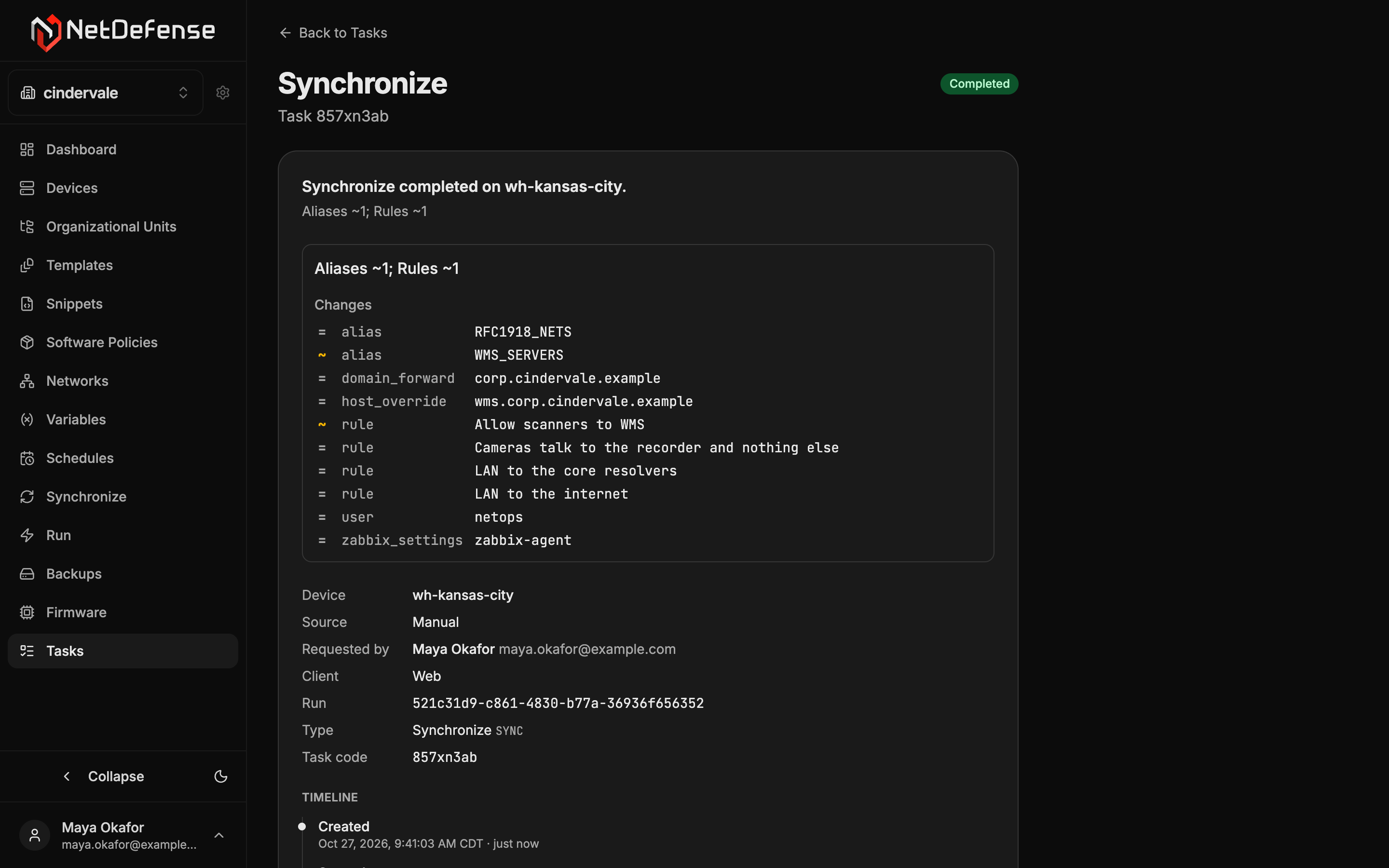
Section titled “Task details”Click a row to open the task’s details in a panel on the right. Escape closes it, and the list stays as it was. While the task is active, the panel keeps it up to date.
From top to bottom, the panel shows:
- The outcome. A sentence such as
Ping failed on fw-branch-01.orPing will run on fw-branch-01 in 1 h., then the task’s one-line result, or why it’s waiting. - The result, when the task returned one. See Results.
- The facts. The Device, linked to its page, or followed by
(deleted), without a link, for a deleted device; the Source, as in Where a task came from. For a task a person started, Requested by: their name, linked to the Members page while they’re a member, with their email beside it, orDeleted account; and the Client:Web,CLI,MCPorAPI token. Then the Run, the code that ties the task to the others of its run; the Type with itsndcliname; and the Task code. A task that belongs to another organization than the one selected in the sidebar also shows its Organization, and its device, source, requester and run aren’t linked. - The timeline. Created, Scheduled for when the task was scheduled, and Started when NetDefense sent the task to the device. Once the task ended, the last entry is Finished, Failed, Expired or Canceled, with the time, how long ago and, for a task that was sent, how long it took:
Took 3 s. While the task is active, the last entries are its Last update and its Deadline, which says what happens then:Expires in 40 s if the device does not take itfor a waiting or scheduled task, orFails in 2 min if the device has not answered by thenfor a running one. A task that ended before its scheduled time saysCanceled before it was due, orEnded before it was due. - Raw message, folded away: the task’s whole message, as NetDefense stored it.
Under them are Cancel task, for a waiting or scheduled task, Open device, when the device has a page to open, and Full page, which opens the task’s own page.
Results
Section titled “Results”Synchronize. A sync lists its result under Changes, one line per object, failures first and then warnings: + created, ~ updated, − deleted, = unchanged, ! a warning, ✗ a refusal or an error, each with its code and message when it has one. One of the device’s own firewall rules that the sync renumbered, to keep the PREPEND rules first, shows as ~ with its old and new sequence number (sequence 1 → 2). See Placement results.
Firmware track step. A completed one shows a Firmware Track Result card. Its subtitle gives the outcome and the reason as a sentence. Its fields are the Step (enroll, advance or unenroll), the Track, the Outcome, the Reason with its code, the From version and To version, the Track release (or the Series, for a series upgrade, which also carries a Series upgrade badge), the Pinned at release, whether the pin was changed outside NetDefense, and the same-version reinstalls the check listed. When the device can’t tell which of several repository problems held a series upgrade, the card lists them, and a series upgrade lists the notes it left. A step that didn’t complete, such as a failed one, shows its plain message. NetDefense creates these tasks. You don’t.
Upgrade firmware. A completed upgrade shows a Firmware Upgrade Result card with the mode, the versions before and after, the packages applied and whether the device rebooted. An upgrade that left base and kernel for a later reboot says Reboot pending — mixed state.
Canceling a task
Section titled “Canceling a task”Cancel task appears only while a task is waiting or scheduled. It asks first, inside the panel: Cancel this task? It won't run on fw-branch-01. Choose Cancel task to confirm, or Keep it. The task then shows as Canceled. Once the device has taken the task, it can’t be canceled. Canceling needs Read-Write access to the organization.
A task’s own page
Section titled “A task’s own page”Full page opens the task at its own address, with the same details, for when you want to link to one task. There, the Run code opens the Tasks page on that run over the last 30 days. Back to Tasks returns to the Tasks view you came from: from a device’s Recent tasks card, all of that device’s tasks over the last 30 days, and from a schedule’s Recent runs card, all of that schedule’s runs over the last 30 days. When you arrived by a link, it opens the default view. A task that NetDefense no longer has reads Task not found.
Auto-refresh
Section titled “Auto-refresh”The page header says when the list was last read, such as Updated just now or Updated 45 s ago. With Auto-refresh on, as it is when the page opens, the list is read again every 10 seconds, except while the browser tab is hidden. Switch it off to hold the list still. Switching it back on reads the list at once.
If a refresh fails, the rows stay on screen under Could not refresh the tasks: …, which says how old they are, with a Retry button.
How long tasks are kept
Section titled “How long tasks are kept”On the default plan, NetDefense keeps finished tasks (Completed, Failed, Expired and Canceled) for 30 days and then removes them automatically. The page’s description, under its title, states your organization’s period, such as History is kept for 30 days. A removed task disappears from this list, and its own page reads Task not found. Waiting, scheduled and running tasks are never removed, and backup files and scheduled specs aren’t affected. See Task retention for the exact rule.
Scheduled specs
Section titled “Scheduled specs”The Scheduled specs tab lists every recurring operation in the organization: the runs, syncs and backups attached to a schedule, and the update windows of firmware tracks. Each fires on its schedule and creates the tasks of the Tasks tab. The tab has an address of its own, so you can link to it.
| Column | Meaning |
|---|---|
| Code | The spec’s code. |
| Schedule | The schedule it fires on. Click it to open the schedule. |
| Kind | RUN, SYNC, BACKUP, or FIRMWARE for a firmware track’s window. |
| What | What it does, such as PING → 2 devices, SYNC · OU: branch-offices, Device backups or Fast track firmware window. |
| Status | Enabled or Disabled. |
| Last fired | How long ago it last fired, with the full time on hover, or Never. |
Filter by schedule narrows the list to one schedule. The … menu on a row has Disable (or Enable) and Remove. Disabling pauses this one operation, while its schedule and the schedule’s other specs carry on. Remove asks for confirmation, then detaches the spec from its schedule for good: it no longer fires, and the schedule itself stays and can be reused.
A firmware track’s window belongs to the track, so its row has a chip icon in place of the menu: a link to the Firmware page, whose tooltip reads Managed on the Firmware page. Attach or detach the track’s schedule on the Firmware page instead.
See Scheduled Tasks for the full concept and the ndcli commands.